


27th November 2025
Essential WordPress Maintenance Tips for a Fast & Secure Website
Most WordPress sites do not fail because of bad design. They fail because of poor website maintenance .
Performance degrades quietly. Security gaps go unnoticed. Plugins accumulate. Then traffic drops, conversions suffer or the site goes offline at the worst possible time.
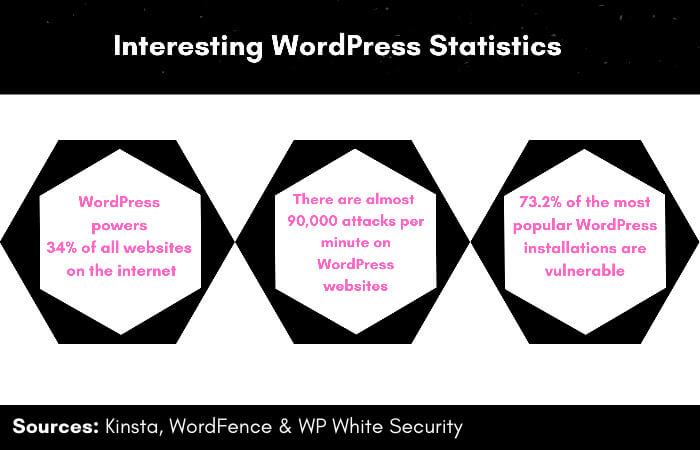
Thanks to our friends at KillTheCableBill.com for the infographic, who provide news, information and reviews on the top streaming platforms.
Maintaining a WordPress website means managing updates, backups, security and performance monitoring on an ongoing basis. Done properly, it prevents the failures that quietly erode speed, stability and search visibility.
These WordPress maintenance tips focus on the tasks that actually prevent downtime, performance loss and security issues, rather than long checklists where everything looks important but very little is prioritised.
Essential WordPress maintenance tips at a glance
If you only do five things, these matter most:
- Keep WordPress core, plugins and themes updated using a staging-first workflow
- Monitor uptime, security events and Core Web Vitals (CWV)
- Run automated daily backups and test restores
- Remove unused plugins and themes
- Review performance and stability trends monthly
Everything else supports these foundations.
Why is WordPress maintenance important?
WordPress website maintenance is not housekeeping. It is risk management. Poor maintenance leads to:
- Slower load times and declining CWV
- Lower conversion rates
- Increased security exposure
- Emergency WordPress development costs
- SEO decay that compounds over time
Well-maintained WordPress sites are faster, more reliable and cheaper to operate. That directly affects revenue and margin.
What most site owners get wrong
Most WordPress maintenance advice fails because it treats all tasks as equal. Common mistakes include:
- Performing dozens of low impact checks instead of monitoring the right signals
- Relying on manual reviews rather than automation
- Disabling updates out of fear instead of managing them properly
- Applying the same routine to every site, regardless of traffic or risk
WordPress site maintenance should be prioritised, automated and proportional to business impact.
Critical WordPress maintenance tips for security and stability
These actions protect against the most expensive failures. They should be treated as mandatory.
1. Update WordPress core, plugins and themes. Outdated software is one of the leading causes of compromised WordPress sites. Updates should be tested in staging, deployed regularly, and rolled back quickly if needed.
2. Run automated backups with tested restores. Daily backups are essential. So are restore tests. A backup you have never restored is a liability, not protection.
3. Monitor uptime and security events. Use monitoring to detect downtime, malware, file changes and login anomalies. Alerts should notify you when something changes, not require constant manual checks. If your site has already been compromised, our hacked WordPress website repair service can restore it and secure it against future issues.
Performance-focused WordPress maintenance tips
Performance issues usually appear gradually. These checks help catch problems early.
4. Track CWV trends. Focus on trends over time, not one-off scores. Watch for creeping load times, layout shift, and script growth.
5. Remove unused plugins and themes. Inactive components still increase attack surface and maintenance overhead. If it is not actively used, remove it.
6. Optimise images and media assets. Compress new uploads, review legacy images, and audit third-party embeds. Media bloat is one of the most common causes of slow WordPress sites.
WordPress maintenance tips most teams waste time on
When it comes to managing a WordPress website, some tasks are frequently recommended but rarely urgent. Examples include:
- Daily manual checks of Google Search Console
- Constant database clean-ups without performance symptoms
- Revalidating HTML standards on stable sites
- Refreshing visuals without a conversion or content goal
These tasks are not wrong. They are just rarely high priority.
Time here is often better spent on monitoring, optimisation, or removing complexity.
Content and SEO hygiene maintenance tips
These checks protect trust, usability and WordPress SEO performance over time.
7. Keep key pages current. Review About, service and contact pages regularly. Outdated content erodes credibility.
8. Review metadata when content changes. Meta titles and descriptions should be reviewed when pages are updated, not on a fixed schedule.
9. Check internal links after site changes. Page removals, restructures and navigation updates often create broken links. Fixing them protects usability and crawl efficiency.
What we do differently
At ALT Agency, we do not follow long checklists. We manage risk. Our WordPress maintenance approach prioritises:
- Automated monitoring over manual checking
- Risk-based maintenance instead of fixed routines
- Staging-first updates with rollback plans
- Ongoing CWV, uptime and conversion tracking
WordPress site maintenance decisions are validated using CWV trends, engagement data and post-update performance monitoring, not assumptions or vendor claims. This keeps WordPress sites stable, fast and predictable as they grow.
So, which WordPress maintenance tips actually matter?
There is no universal routine when it comes to maintenance for WordPress websites. The right focus depends on:
- Traffic volume
- Revenue dependency
- Security exposure
- Internal capability
For most businesses, fewer, well-managed maintenance actions outperform long lists executed inconsistently.
The goal is not to do more. It is to prevent the failures that cost the most.
If you are unsure where to focus, start by identifying what would hurt the business most if it broke. That is where WordPress website maintenance delivers real value.

Craig Murphy
Craig Murphy is the founder and Managing Director of ALT Agency. He has worked in digital marketing and web development since the early days of the commercial internet, with a focus on growing businesses online. Craig is open about being autistic and how it shapes his approach to problem-solving, data and business leadership. Alongside agency work, he also runs a private investment business supporting early-stage entrepreneurs.
Is your WordPress website being properly maintained?
Keep your website fast, secure and performing as it should.
WordPress maintenance is not just about running updates. It is about protecting your website from downtime, security issues, performance drops and costly fixes later on. Our team manages WordPress websites that need to stay fast, secure and reliable, with the right checks, updates and monitoring in place to keep everything running smoothly.
Keep Your Website Running Smoothly