


10th December 2025
How to Fix 404s Without Wasting Months of Effort
404 errors and lengthy redirect chains are among the most common (and expensive) technical SEO issues for large websites. They quietly drain crawl budget, waste link equity, interrupt user journeys and chip away at your search visibility.
However, the mistake many in-house marketing teams make is trying to fix everything at once, instead of focusing on what actually impacts revenue. The reality is that not every 404 needs a redirect, not every redirect is helpful and not every SEO task requires a lengthy audit before recommendations are implemented.
At ALT Agency, we’ve worked with ecommerce businesses and other large websites dealing with thousands of pages, outdated CMS logic and years of legacy redirects. In many cases, a small number of broken URLs were responsible for the majority of SEO issues.
This guide walks you through how we approach these problems: what to fix first, what to leave, and how to create a workflow that keeps things clean for many months (and hopefully years!) to come. But first, what exactly are 404s?
What are “404s”?
A 404 is an HTTP status code returned when a URL no longer points to a live page. On many websites, 404s are completely normal. On ecommerce websites, they typically occur when:
- A product is discontinued or removed
- A category is renamed or deleted
- A CMS changes URL structures automatically
- Filtered or parameterised URLs are created but don’t persist
- Internal links lead to outdated or mistyped URLs

There is a difference between a 404 and a 410 status code. A 404 means “this page isn’t here right now”, while a 410 means “this page is permanently gone”.
From a Google perspective, both remove URLs from the index over time. The difference is speed and intent. A 410 tells Google to drop the page faster because you’re explicitly saying it’s never coming back.
It’s easy to assume that 404s mean something’s broken but really they’re a normal part of how a business evolves. Products get discontinued, ranges change and, due to this, URLs change or become obsolete. A 404 isn’t a failure; it’s just part of the normal ecommerce lifecycle. The real challenge isn’t avoiding 404s altogether, but managing them in a way that protects your SEO, customer experience and, ultimately, revenue.
1. Focus on the 404s that are hurting rankings and revenue
One of the most common mistakes is trying to fix every broken URL on a website. However, many 404s aren’t doing any damage and don’t need to be touched. What matters is identifying the ones that are actually costing you traffic, authority or revenue. The basic rule to follow is, if a 404 links, traffic or ranks, fix it. Otherwise, leave it be.
Start with URLs that have external backlinks. If a deleted product page once earned links from high quality blog posts or news articles, for example, that equity is now being wasted.
Backlinks aren’t the only signal that matters. Some deleted pages still pull in organic traffic months or even years after removal. Before you redirect or kill anything permanently, check:
- Search console performance data
- Historic analytics
- Server logs (for real crawl demand)
If a deleted page is still earning search traffic, the best fix is often to restore it properly, not redirect it elsewhere. A rebuilt page keeps relevance, protects rankings and avoids forcing users into second-best destinations.
In other cases, the fix is simple: redirect these product URLs to the most relevant equivalent live URL. That might be a newer version of the product, a parent category or a collection page. The goal is to recover lost authority and push it back into your commercial pages.
When dealing with discontinued products, avoid defaulting to the homepage; this is usually the worst option and results in “soft” 404 errors . Instead:
- If there’s a clear replacement, redirect to that.
- If not, but the category still holds commercial value, redirect there.
- If there’s no relevant match and no traffic or links, let it 404.
Redirects should make sense for users and for Google. Forcing irrelevant redirects only adds clutter and risks redirect chains.
There are plenty of URLs you shouldn’t redirect at all. These include filtered or faceted URLs, promo pages, internal search results or tracking URLs.
The pattern we see across most audits is that around 20% of broken URLs cause 80% of the damage. Prioritising those few high impact errors usually delivers the biggest gains.
In a lot of website audits , we see teams redirecting far more than they need to. Redirecting low value URLs doesn’t improve SEO. In fact, in many cases, it does more harm than good by creating redirect chains, soft 404s and clutter. Often, the best move is the simplest one: let the URL return a 404!
2. Clean up internally linked 404s
Before you worry about any historic errors, fix the 404s your own site is linking to internally. These are particularly harmful because they create dead ends for both users and Google.
Before fixing anything, you need to know where the error is coming from. We split 404s into three types:
Internal 404s: Links on your site pointing to removed URLs. These are fully within your control and should be fixed first.
External 404s: Links from other websites pointing to old URLs. These waste authority but don’t damage your internal structure.
System-generated 404s: URLs created by filters, search functions, plugins or parameters that never represented real pages in the first place.
Only the first two usually justify redirects. System-generated 404s are often harmless background noise unless they’re linked internally or crawled at scale.
Every broken internal link sends crawl budget into a black hole. It interrupts journeys, weakens authority and tells search engines your site structure can’t be trusted.
Finding these is straightforward with a crawler like Screaming Frog . Simply filter for 4XX errors that have internal inlinks. These are usually some of the most rewarding fixes because they’re entirely within your control.
Internally linked 404s are more damaging than external ones because they’re active: your site is still pointing to them. They can slow indexing, dilute link value and negatively affect how Google interprets your site as a whole.
There are two types of fixes here; quick and structural:
Quick wins: These might include outdated menu items, old banners or product links pointing to removed variants. They can be fixed quickly and often lead to immediate improvements in crawl behaviour and user experience.
Structural issues: These are more complex and include things like faceted navigation creating broken URLs, auto-generated XML sitemaps listing invalid pages or pagination loops. They typically require developer support but can significantly improve site health once resolved.
We’ve seen this time and again in audits: one broken pattern repeated across templates can wreck crawl efficiency across thousands of pages. Fixing these internal 404s early sets the foundation for every other SEO improvement.
That said, not every internal 404 is an SEO issue, but every internal 404 is a conversion issue. In ecommerce, a broken link in the user journey is often where a customer drops off. Fixing these isn’t just about saving crawl budget ; it’s about protecting revenue.
3. Create a bespoke 404 page
Even when a page should 404, the experience still matters. A strong ecommerce 404 page should:
- Explain clearly that the product or page is no longer available
- Show popular categories, an internal search option and any other key commercial pages (such as popular products)
- Keep users shopping, not bouncing
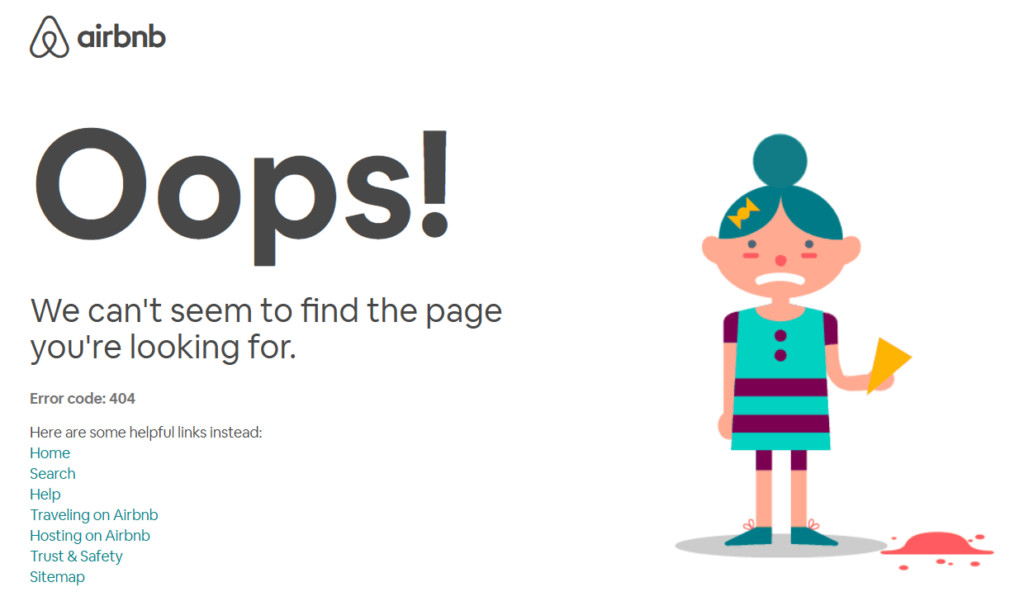
This doesn’t fix issues with crawl budget or link equity but it does protect conversions. On large websites, that alone makes it worth doing properly.
4. Eliminate redirect chains
Redirects are part of life for any website, ecommerce or otherwise. However, redirect chains, where one redirect leads to another and then another, slow everything down. They waste crawl budget, dilute link equity and can frustrate users with unnecessary page hops (although this process isn’t usually visible if pages load quickly).
Google doesn’t like them either . The more redirects between the original URL and the destination, the harder it is for Google to process.
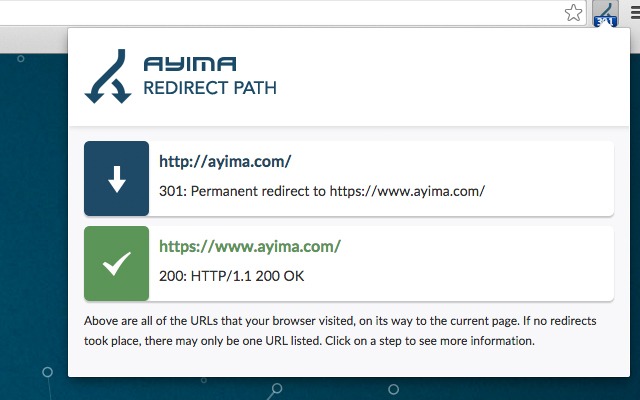
To find redirect chains, run a site crawl using a tool like Screaming Frog and look for multiple-hop redirects or loops. You can also find them when visiting a page in your browser by using an extension like Redirect Path . These usually arise from small changes: renaming categories, replacing products or changing URLs without cleaning up existing internal references to them.
Sometimes, the solution is to delete the redirect entirely, especially if the original page had no traffic or links, or if the destination no longer exists or is irrelevant. More often, though, the issue is internal links still pointing to outdated URLs. Even after setting up redirects, many ecommerce sites fail to update their menus, banners or templates. That means every click (and crawl) takes an unnecessary step.
The key fix is to link directly to the final destination URL. This improves load times, preserves link equity, and stops new redirect chains from forming.
5. Employ redirect rules
Manually fixing hundreds or thousands of broken pages often isn’t realistic, nor is it always necessary.
If your URLs follow consistent patterns (such as including specific parameters or sitting within specific subdirectories) you can create rules that automatically redirect whole groups of URLs to relevant landing pages or, in the case of ecommerce websites, categories or successor products.
For example, imagine an ecommerce site selling branded headphones. All discontinued Sony headphones could be redirected to the “Wireless Noise Cancelling Headphones” category, rather than trying to map each one individually. This keeps things scalable and helps Google consistently find relevant pages.
One rule to stick to: never redirect to the homepage unless it genuinely makes sense. Google treats irrelevant redirects (like product pages pointing to the homepage) as soft 404s, which means you lose the benefit entirely.
Also be wary of parameters. Ecommerce URLs often include filters, sorting or pagination, and these can easily create redirect loops if not handled carefully. Strip or standardise them before applying rules.
Be careful not to build redirect rules around CMS or plugin noise. We regularly see /feed/, filtered search URLs and pagination variants being “fixed” with redirects they never needed.
If a URL never represented a real page, had no links and no traffic, redirecting it adds clutter without recovering value. In those cases, the best fix is often no fix at all!
6. Build a workflow
Fixing your 404s once isn’t enough. Without a clear workflow, the same issues will come back.
Here’s how to keep on top of it:
Run monthly broken link checks using a mix of tools: Use a crawler for internal errors, Search Console for external issues, and server logs to see what Google is actually hitting. Combined, these give a clear picture of where problems lie.
Review your redirect rules regularly: As your site evolves, rules that worked previously may now create loops or point to irrelevant destinations.
Make sure responsibilities are clearly split: For example, SEO teams handle discovery, mapping and prioritisation, while developers handle implementation and testing. This avoids the “nobody owns it” problem.
One way to save time and resources is to go beyond search console, Screaming Frog and Ahrefs data. By checking server logs to see which 404s Googlebot is actually hitting, you can focus on the pages that matter. In many cases, that alone can cut the list of 404s to fix by 70% or more.
As with any ecommerce SEO recommendation, it’s also important to not let these fixes sit in a development backlog for months. At ALT Agency, our SEO and web development teams work side-by-side, so fixes go live quickly.

Klaudia Majewska
Klaudia Majewska is an SEO Account Manager responsible for planning, executing and reporting on SEO campaigns across a range of clients. Her work focuses on turning strategy into consistent, measurable performance through clear priorities and ongoing optimisation. Klaudia has a strong technical SEO background and works closely with emerging AI-led search formats. She specialises in making sure products and services are structured and presented in ways that perform across both traditional search results and newer AI-driven search experiences.
Got broken links on your website?
Fix the ones that are actually worth fixing.
Not every 404 needs hours of work, but some broken links can send customers to dead ends, waste useful SEO value and make your website harder for Google to crawl. Our SEO and development teams work together to find and fix the broken links, redirects and 404 errors that are causing real problems.
Fix Your Broken Links