



19th January 2026
The Ultimate Guide to XML Sitemaps
XML sitemaps are one of the most common technical SEO elements on a website, but they are often misunderstood or neglected.
A sitemap helps search engines discover and crawl the pages you want indexed. When implemented correctly, it can make it easier for search engines like Google to understand your website’s structure and locate important content. However, sitemaps are frequently misconfigured, outdated or bloated with URLs that should not be indexed. In technical SEO audits , they are a recurring source of problems.
This guide explains what XML sitemaps are, when they help, what Google expects and how to audit and improve them. It also covers how to submit a sitemap in Google Search Console. Google treats sitemaps as a discovery mechanism, not a ranking factor , so the value comes from accuracy and maintenance, not from simply having one.
Table of contents
- What is an XML sitemap?
- XML vs HTML sitemaps
- When sitemaps help SEO
- Do all websites need a sitemap?
- Sitemap rules and limits
- Sitemap index files and child sitemaps
- How to find your sitemap
- Static vs dynamic sitemaps
- How to create an XML sitemap
- Tools that can generate XML sitemaps
- What to include (and what to remove)
- How to test and audit a sitemap
- How to submit a sitemap
- Ongoing housekeeping checklist
What is an XML sitemap?
An XML sitemap is a file that lists the URLs you want search engines to discover and crawl. It helps Google understand your site’s structure and locate important pages, especially when your internal linking is complex or new pages are not easy to find.
Google also supports other formats such as RSS feeds, Atom feeds and plain text sitemaps. These formats can function as discovery mechanisms for frequently updated content. For example, many blogs effectively expose an RSS feed that search engines can treat similarly to a sitemap. However, XML remains the most widely used format because it supports richer structure and is easier to scale across large websites .
A standard XML sitemap includes:
<loc>: the page URL (this must be a full, absolute URL)
<lastmod>: the last modified date (optional, but useful when accurate)
Other tags exist, but many are not relied on heavily by Google
If you publish a sitemap, treat it like an API you are giving to Google. It should be clean, consistent and up to date.
XML vs HTML sitemaps
An XML sitemap is designed for search engines, while an HTML sitemap is designed primarily for users.
An XML sitemap is a structured file that search engines read to discover URLs. It sits behind the scenes and is not intended for human navigation. An HTML sitemap, on the other hand, is a page on your website that lists important sections or pages to help visitors navigate the site.
For SEO purposes, the XML sitemap is usually the more important of the two, as it directly assists search engines in discovering URLs that may not be easily reachable through normal internal linking.
When sitemaps help SEO
Sitemaps do not guarantee indexing, and they do not directly improve rankings. They are a structured way to help search engines discover URLs you consider important.
They are most useful when:
- Your website is large or has a complicated structure
- You publish new pages regularly (this is especially the case for ecommerce websites and publishers)
- You have a new site with limited external links
- You have recently migrated or made structural changes
They are less useful when:
- Your internal linking is already clean and complete
- Your sitemap is bloated with low value URLs, duplicate pages or redirects
- You cannot keep it maintained, so it becomes inaccurate over time
A sitemap is only helpful if it reflects reality.
Do all websites need a sitemap?
Not every website needs a sitemap, and many small sites can be crawled perfectly well without one.
If your internal linking is clean, your navigation is consistent and your key pages are easily reachable, Google will often discover everything it needs through normal crawling. In those cases, a sitemap is not harmful, but it is rarely a priority.
Sitemaps become significantly more useful when crawl discovery is harder or when the website changes frequently. This is common on ecommerce websites, publishers and any site with large numbers of URLs.
You are far more likely to need a sitemap if:
- The site is large or frequently updated
- Important pages are not consistently linked internally
- The site uses faceted navigation, filtering or parameter-based URLs
- You have recently migrated, replatformed or changed URL structures
The key point is that sitemaps are not a requirement, but they are often a practical necessity once scale and complexity increase.
Sitemap rules and limits
Google follows the sitemaps protocol and enforces practical limits. The key ones to remember are:
- 50,000 URLs per sitemap
- 50MB uncompressed file size per sitemap
- Use a sitemap index if you need multiple sitemap files
- The file must be correctly formatted and accessible to Googlebot
The main point is that large sitemaps are slower to fetch, slower to validate and harder to audit. If you have a large website, it makes sense to split them into logical groups instead.
Sitemap index files and child sitemaps
A standard sitemap is one list of URLs. A sitemap index is a file that lists multiple sitemap files (often called child sitemaps). This helps when:
- You exceed the URL or size limits
- You want to group URLs by type (e.g. products, categories, blog posts) so analysis is easier
This also makes Search Console diagnosis faster because you can isolate problems by section.
How to find your sitemap
Most sites use a predictable location, commonly:
- /sitemap.xml
- /sitemap_index.xml
But the URL can be anything as long as the file is valid and accessible.
If you cannot find it:
- Check robots.txt for a sitemap reference. Many websites declare their sitemap using the following directive:
- Sitemap: https://example.com/sitemap.xml
Search engines read robots.txt during crawling, so including this line helps them discover your sitemap automatically.
- Check Google Search Console’s Sitemaps report to see what has been submitted previously
Static vs dynamic sitemaps
Before you audit or rebuild a sitemap, it’s important to understand how it is generated. Most sitemap issues trace back to this decision. Static sitemaps and dynamic sitemaps behave very differently, and each comes with predictable risks if not managed properly.
A static sitemap is generated at a point in time (for example, from a crawler export). It becomes outdated unless someone regenerates it. This is where problems creep in, such as the sitemap including old URLs that now return a 404 error.
A dynamic sitemap is generated by your CMS or platform and updates automatically. This is usually better, but it can create its own issues if the rules are wrong. For example, it might include non-canonical URLs or expose internal URLs that you do not intend to be indexable.
Not sure if your sitemap is helping or hurting SEO?
We audit, fix and manage sitemap logic as part of broader technical SEO, so search engines find what actually matters.
How to create an XML sitemap
How you create a sitemap depends on how your site is built and how often URLs change. The method matters less than the output: a sitemap should only contain canonical, indexable URLs and it should stay accurate over time.
Step 1: Choose the right generation method
Start by deciding how the sitemap will be produced:
CMS-generated (recommended for most websites): Automatically updates as the site changes, provided the inclusion rules are correct.
Static export (acceptable for small websites): Quick to produce, but becomes outdated unless regenerated.
Dynamic database-driven generation (typical for large websites): The most scalable approach, often paired with a sitemap index and segmented child sitemaps.
If you already have a sitemap, confirm how it is generated before changing anything.
Step 2: Define inclusion rules before generating anything
Treat this as a technical specification. At minimum:
- Only include canonical URLs
- Exclude noindex pages
- Exclude redirects and 4xx URLs
- Use one consistent URL format (HTTPS, trailing slash policy, www/non-www)
If you do not define these rules first, the sitemap will reflect whatever your CMS outputs by default, which is where bloat usually comes from. You can find further information on what should be included (and what shouldn’t be) later in this article.
Step 3: Generate the sitemap file(s)
Generate the sitemap using your chosen method, then validate that it follows the protocol. A minimal XML sitemap looks like this:
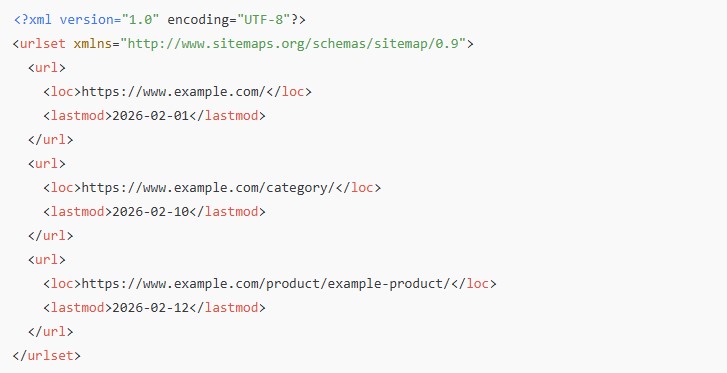
The <loc> element must contain a full absolute URL. The <lastmod> tag is optional, but should only be included if it can be kept accurate. If the date is unreliable, it is better omitted.
For large websites, split into multiple sitemap files and use a sitemap index. This improves fetch efficiency and makes diagnostics easier.
Step 4: Publish it where Google can access it
The file can live anywhere, but common conventions still apply:
- https://example.com/sitemap.xml
- https://example.com/sitemap_index.xml
Ensure the sitemap is:
- Publicly accessible to Googlebot
- Not blocked by robots.txt
- Not behind authentication
- Returning a valid 200 status code
At this point, the sitemap should be tested and submitted via Google Search Console. We cover this process in more depth later in this article.
Tools that can generate XML sitemaps
Most XML sitemaps are generated automatically, either by the CMS itself or through a plugin or extension. This is common across ecommerce platforms and publishing systems, and it is usually the preferred approach because it reduces the risk of the sitemap becoming outdated.
Crawling tools can also generate sitemaps by exporting a crawlable URL set. This can be useful for small sites, one-off projects or migration support, but it should be treated with caution. A crawler will often discover URLs that exist technically but should not be indexed, such as paginated variants, filtered URLs or legacy paths.
Some teams generate sitemaps through custom scripts or internal tooling, especially on enterprise websites . This is often the most flexible approach, but it relies entirely on the accuracy of the inclusion logic.
The tool itself matters less than the rules behind it. If the generation process cannot reliably exclude non-indexable URLs and reflect canonical intent, the sitemap will quickly become a source of noise rather than a useful discovery mechanism.
What to include (and what to remove)
This is where most sitemap audits pay for themselves. The goal is simple: your sitemap should list the URLs you actually want indexed.
Only include canonical URLs
If a URL is not the canonical version, it does not belong in your sitemap. Keep the sitemap aligned to your canonical signals, otherwise you create mixed messages.
Use your preferred URL format consistently
Your sitemap URLs should match your chosen format:
- HTTPS if your site is HTTPS
- Consistent trailing slash or non-trailing slash
- Consistent www or non-www
Remove redirects, 404s and noindex URLs
A sitemap is a signal of intent. It tells search engines which URLs you want crawled and considered for indexing. When it includes URLs that cannot or should not be indexed, that signal becomes noisy and inefficient. These URLs create wasted crawl paths:
- Redirects force extra hops
- 404s waste crawl effort
- Noindex URLs contradict the purpose of including the URL in a sitemap
In isolation, these issues may seem minor. At scale, they slow crawling, delay discovery of important pages and reduce confidence in the sitemap as a reliable source.
There are short-term exceptions. During website migrations , redirects or removed URLs may be temporarily included to help search engines process changes. Treat these as transitional measures and remove them once the migration has stabilised.
Investigate orphan URLs
If a URL is in the sitemap but not linked internally, ask why. We often see the following types of URLs included:
- Old landing pages
- Test pages
- Tag and filter URLs that were never meant to be indexed
If a URL matters, link to it properly. If it does not, remove it from the sitemap and decide whether it should be noindexed, redirected or removed from your website completely..
Remove sitemap bloat
Sitemaps often fill up with low value URLs because the CMS includes “everything by default”. Common bloat sources include:
- Internal search pages
- Tag archives and author archives
- Filter combinations and faceted navigation URLs
- Paginated variants
- Attachment URLs (common in WordPress setups)
If the page has no unique purpose in search, it usually should not be in the sitemap.
Check for missing key sections
After clean-up, validate the opposite risk: have you accidentally removed important URLs?
Manually check that your key templates are present:
- Core category or service pages
- Top products or collections
- Key informational hubs
Use <lastmod> properly (or don’t use it)
The <lastmod> tag tells search engines when a page was last meaningfully updated. It is intended to help prioritise recrawling, not to indicate routine or cosmetic changes.
<lastmod> is only useful if it reflects a genuine content update. Do not change it for trivial edits such as footer updates, styling tweaks or technical SEO housekeeping. When the date is misleading or identical across large numbers of URLs, the signal is ignored.
If you cannot keep <lastmod> accurate, remove it. An absent signal is safer than an unreliable one.
Ignore the priority and changefreq tags
The <priority> and <changefreq> tags were designed to suggest relative importance and update frequency for URLs in a sitemap. In practice, modern search engines ignore these tags .
Many CMS tools still output these tags by default. That does not make them useful.
Effort is better spent elsewhere. Search engines infer importance and crawl behaviour from signals such as internal linking, canonicalisation and actual content change patterns. Artificially assigning priorities or frequencies does not override those signals.
Use correct URL encoding and UTF-8
Your sitemap must be valid XML, correctly encoded and properly escaped. If it is malformed, Google may not be able to process it at all.
Add media sitemaps where they genuinely matter
In addition to standard XML sitemaps, Google also supports specialised sitemap extensions for images, video and news content. These provide structured signals that help search engines understand and surface media assets more effectively.
Media sitemaps are only worth the effort when media visibility supports a clear business or acquisition goal. They are most relevant when:
Images: drive discovery or conversion, such as in ecommerce, travel, property or visually led editorial content.
Video: is a primary content format, for example product demos, explainers, tutorials or publisher-led video content.
News: visibility is business critical, such as for publishers or news organisations.
In these cases, dedicated image, video or news sitemaps help search engines discover and prioritise media that may otherwise be missed or under-indexed.
If media does not play a direct role in search visibility, traffic or conversion, adding these extensions adds complexity without clear return. In those situations, keep the core XML sitemap focused on your most important URLs.
Only add hreflang alternates if you have a real international setup
If you run multiple languages or regions, hreflang tags can be implemented in different ways. A sitemap-based approach can work, but it adds operational overhead. Only do it if you have the governance to maintain it.
How to test and audit a sitemap
Testing a sitemap properly requires more than a single check. The aim is to confirm that it reflects the real structure of the site, supports efficient crawling and sends consistent signals to search engines.
Start by crawling the sitemap on its own. This quickly surfaces obvious issues such as:
- Redirects
- 404 URLs
- Blocked pages
- Non-canonical URLs
Any crawler that supports sitemap input is sufficient. We use Screaming Frog’s SEO Spider , but the specific tool matters less than identifying URLs that should not be included in the first place.
Next, compare sitemap URLs against a full site crawl. This reveals two important patterns. URLs present in the sitemap but not linked internally indicate orphan pages. URLs linked internally but missing from the sitemap may be important pages that are not being surfaced properly. Both point to structural issues rather than simple sitemap errors.
Before acting on any findings, review patterns manually. Tools surface issues, but they do not understand intent. Check whether flagged URLs are intentionally excluded from indexing, legacy pages that still require redirect coverage or valuable pages affected by broken internal linking. Bulk changes without this review often create more problems than they solve.
If URLs are removed from the sitemap, decide what should happen to them next. Removing a URL from a sitemap does not remove it from search engines. Each case still requires the correct technical instruction:
Noindex: if the page should exist for users but not search
301 redirect: if there is a clear replacement
404 or 410: if the content is genuinely gone and should disappear over time
A sitemap audit is less about perfection and more about consistency. When sitemap URLs, internal linking and indexing signals align, search engines can crawl and process the site efficiently, and important pages are far more likely to be discovered and maintained in the index.
How to submit a sitemap in Google Search Console
Google Search Console allows you to submit a sitemap and monitor how Google processes it. Submission does not guarantee indexing, but it does confirm that Google can access and read the sitemap correctly. Here are the steps you should take in order to submit an XML sitemap:
- Open Google Search Console
- Go to Sitemaps
- Submit the sitemap URL (use the index file if you have multiple sitemaps)
- Monitor status and the number of discovered URLs
If Google cannot access the sitemap, resolve fetch issues first. These are usually caused by incorrect paths, robots.txt restrictions, authentication barriers or server errors.
Once submitted successfully, use the report to confirm that Google is reading the sitemap consistently and discovering the URLs you expect.
Ongoing housekeeping checklist
Sitemaps reflect the current state of a website. As the site changes, the sitemap needs to change with it. When it doesn’t, search engines are given outdated or conflicting signals, which slows crawling and reduces confidence in the URLs you want indexed.
At a minimum, review the sitemap when meaningful changes occur and sanity-check it periodically. That typically includes:
- Checking sitemap status in Google Search Console to confirm it is being read and processed
- Re-auditing after migrations, platform changes or major URL structure updates
- Keeping sitemap URLs aligned with your canonical rules
- Removing legacy or unused sitemaps from Search Console once they are no longer required
Pay attention to patterns rather than individual URLs. A rising number of “submitted but not indexed” pages is rarely a sitemap problem on its own. It is usually a signal of deeper issues such as duplication, low value pages or sitemap bloat that need addressing at source.
Effective sitemap management is about accuracy and intent. When the sitemap consistently mirrors the site you actually want search engines to crawl and index, it does its job quietly and reliably without ongoing intervention.
If you take one thing from this guide, make it this: Only submit URLs you genuinely want indexed and keep the file accurate over time.

Klaudia Majewska
Klaudia Majewska is an SEO Account Manager responsible for planning, executing and reporting on SEO campaigns across a range of clients. Her work focuses on turning strategy into consistent, measurable performance through clear priorities and ongoing optimisation. Klaudia has a strong technical SEO background and works closely with emerging AI-led search formats. She specialises in making sure products and services are structured and presented in ways that perform across both traditional search results and newer AI-driven search experiences.
Is your sitemap helping Google find the right pages?
Make sure your most important URLs are easy to discover.
An XML sitemap should point search engines towards the pages you actually want indexed. Our SEO team fixes sitemap issues, crawl problems and technical SEO errors that make your website harder to understand, helping your important pages get discovered, crawled and indexed properly.
Fix Your Sitemap Issues